Quickly contact mobile customer service via phone, SMS, email, and WhatsApp.
On mobile devices, users can quickly select contact information from customer profiles or the current chat. Whether this option appears depends on whether a valid phone number or email address is already saved in the profile.
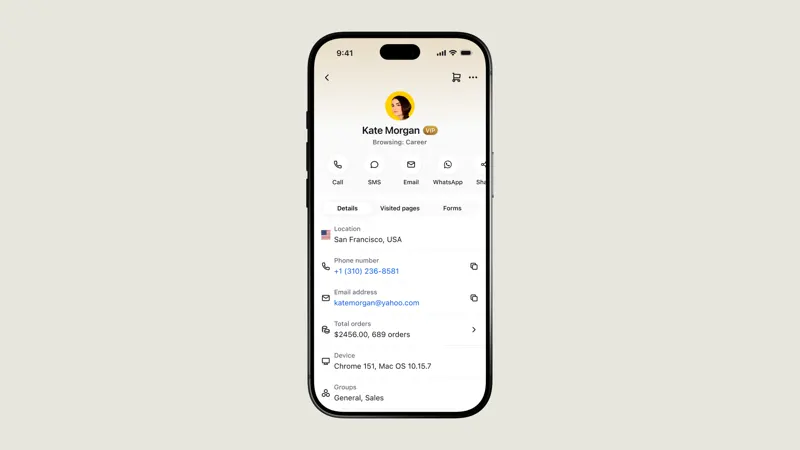
Open the customer profile and view actions such as phone number, SMS, email, WhatsApp, and shared contact cards under the name. If the desired entry is not found, edit the information to complete the phone number or email address and save. For international numbers, verify the area code to prevent applying local formats to another market.
The contact option can also be found by clicking on the customer's title in the current session. The original chat operation was located in the "More" menu; the two locations serve different purposes. Assign the on-duty staff to initiate SMS and email drafts from the same example, confirm the selected address is correct, and then decide whether to actually send the message.
The data page also provides options to copy, save to phone contacts, and import contacts. If customer service uses a personal phone, first clarify which data the team allows to be synced and when it should be cleared. A quick contact does not mean the original channel's conversation has been updated; important commitments should still be entered into the official record.