LiveChat seat pricing: Cross-border customer service shifts, simultaneous logins, and capacity expansion fees.
For accounts that use concurrent seat billing, capacity should be calculated based on the number of people logging in at the same time. Overlapping shifts, supervisor logins, and automatic seat additions can all affect the budget.
First, confirm the billing method on your subscription page. For accounts charged per concurrent seat, the number of customer service accounts created can exceed the number of seats purchased. For example, if a team has ten customer service accounts and three concurrent seats, a maximum of three people can log in simultaneously. Even if no new chats are initiated after logging in, a seat will still be occupied. Regular seats, administrators, and owners are all counted in the number of concurrent logins.
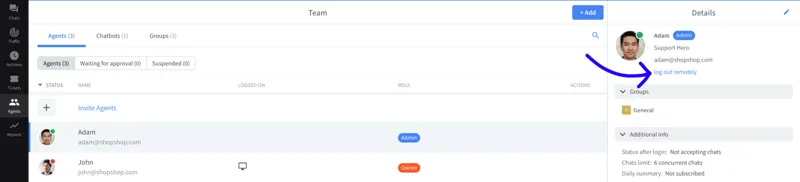
When the limit is reached, the next member attempting to log in will not automatically remove the currently online user. When scheduling cross-timezone shift changes, the overlapping time can be included in the usage. If a member from the previous shift forgets to log out, authorized personnel can find that member in Agents and remotely log them out. Before performing this operation, it should be confirmed whether the other party is still processing customer messages.
Owners can adjust the number of seats in the Subscription. If the account offers Flexible pricing, once enabled, login requests exceeding the limit may trigger automatic seat additions and incur corresponding charges. For teams with significant temporary fluctuations in headcount, it's best to list the concurrent headcount for normal shifts, peak promotional periods, and when managers join, before deciding whether to accept automatic expansion.