WHMCS Customer Service Integration: Install LiveChat and understand the status of chat history being converted into work orders.
For mainframes or digital service stations, WHMCS can display a chat window and can also be configured to save chat logs as work orders. These two functions should be verified separately.
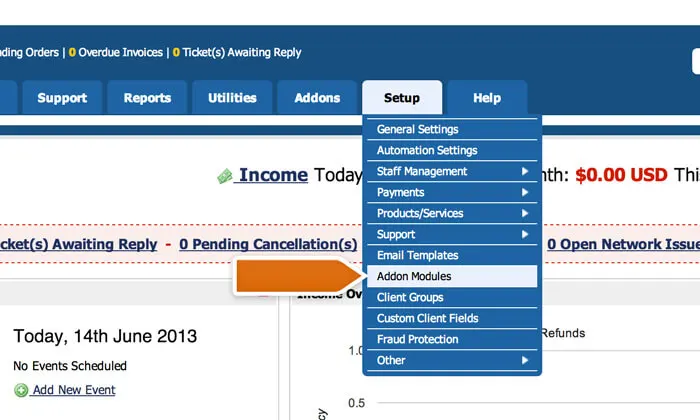
Place the applicable LiveChat add-on modules in the WHMCS add-on directory, enable them in the backend, enter the correct LiveChat license number, and save. This completes a closed loop: a visitor sends a technical inquiry, customer service receives it from the correct account, and then replies in the same window.
If conversation logs need to be saved, the WHMCS integration on the other side also needs to be configured, specifying the site address, authorization, and receiving department. Use an authorization method that matches the current system version, and save credentials only in the restricted configuration. Confirm that the target department is the personnel responsible for this service, and not a queue common to all customers.
The original guidelines stated that transferred chat logs are saved as closed tickets. Therefore, "archived" does not mean there are still pending issues. Simulate a consultation that still requires technical follow-up to check if the team has created or reopened a valid task, and link the responsible person, the next contact time, and the original chat log.